Long hours at a desk can gradually pull the head forward, especially when your screen sits too low. You may notice a tight neck, rounded shoulders, headaches, or aching between the shoulder blades. These signs often appear after months of repeated habits, not one unusually long workday. The good news is that posture can improve with consistent, practical changes. Small adjustments matter.
This guide explains how to fix forward head posture from desk work using ergonomic setup, movement breaks, strengthening exercises, and realistic daily habits. A monitor positioned near eye level can reduce repeated neck bending. Supporting your feet and keeping your elbows relaxed may also reduce unnecessary tension. Physical therapists commonly assess posture alongside mobility, strength, pain patterns, and work demands. That broader view is important because one exercise rarely solves everything.
Progress may feel uneven. Some people notice less stiffness within weeks, while others need professional assessment for persistent pain, numbness, weakness, or dizziness. Do not force your neck into a “perfect” position or ignore symptoms that worsen. Comfort and control are better goals than rigid stillness. Your desk may be part of the problem, but sleep, stress, vision, and activity levels can influence recovery too. This article offers evidence-informed guidance, yet it cannot replace an individualized evaluation. I have found that sustainable changes usually beat dramatic routines, although results depend on consistency and personal circumstances.
Understanding How Desk Work Causes Forward Head Posture
Desk work can slowly pull the head forward. The change often begins with a low laptop, a distant screen, or hours without movement. Your eyes chase the display, while your chin drifts toward it. Neck muscles then work continuously, even during quiet tasks. By evening, the upper back may feel tight, and turning your head can become uncomfortable.
The World Health Organization recommends 150–300 minutes of moderate physical activity weekly for adults. It also advises reducing prolonged sedentary time. That matters because sitting still for long periods gives the neck fewer chances to reset. Workplace ergonomics guidance recommends placing the monitor near eye level, keeping the screen about an arm’s length away, and supporting the lower back. Small changes help.
Stand up regularly.
A 2020 review in Applied Ergonomics linked poor workstation setup and prolonged computer use with increased neck and shoulder symptoms. Still, posture is not the whole story. Stress, sleep, vision problems, and weak movement habits may also contribute. I once assumed a “perfect” upright position solved everything. It did not. Holding one rigid posture created different discomfort. A better approach is frequent position changes, gentle movement, and professional assessment when symptoms persist.
2026 Best Ways to Fix Forward Head Posture from Desk Work
Assessing Posture, Mobility Limits, and Workplace Risk Factors
Forward head posture should be assessed, not guessed from a single photograph. Check the side view while sitting naturally, with feet supported and shoulders relaxed. Note whether the ears sit far ahead of the shoulders. Also record neck discomfort, headaches, tingling, and reduced rotation. Posture alone does not prove injury. The World Health Organization reported that musculoskeletal conditions affect approximately 1.71 billion people worldwide (WHO, 2022), so workplace symptoms deserve careful attention.
Mobility testing can reveal the real limitation. Try a gentle chin tuck, then rotate the head without lifting the shoulders. Tight chest muscles, limited upper-back extension, and weak deep neck muscles may influence desk posture. Workstation risks matter too. A monitor positioned too low can encourage repeated neck flexion. A laptop used without external adjustment may create the same problem. OSHA recommends keeping the screen near eye level and maintaining a neutral head position. Yet, “perfect posture” is unrealistic. Movement variety may matter more than holding one rigid position.
Tips: Raise the screen to eye level. Keep elbows near your sides. Change position every 30–45 minutes. Walk for two minutes. Use gentle mobility drills, not forceful stretching. Track symptoms for two weeks. If numbness, weakness, or persistent pain appears, seek assessment from a qualified healthcare professional. These signs should not be ignored.
Assessing posture, mobility limits, and workplace risk factors with the RULA action-score framework.
Check whether the head is positioned in front of the shoulders, the neck is flexed toward the screen, and the upper back is rounded during normal desk work.
Compare comfortable neck rotation, extension, and shoulder movement from side to side. Pain, numbness, weakness, or a clear loss of motion should be assessed by a qualified clinician.
Common contributors include a low screen, unsupported forearms, prolonged static sitting, frequent phone viewing, and insufficient movement breaks.
The chart shows the four RULA action-score bands: scores 1–2 indicate low immediate risk, while scores 7 require immediate investigation and change. RULA is an observational screening tool, not a medical diagnosis. Reference: McAtamney and Corlett, Rapid Upper Limb Assessment, 1993.
2026 Best Ways to Fix Forward Head Posture from Desk Work
Desk alignment often matters more than forced stretching. The U.S. Bureau of Labor Statistics recorded 946,650 private-industry cases involving days away from work in 2023. Musculoskeletal conditions remain a significant workplace concern, although posture is only one possible contributor.
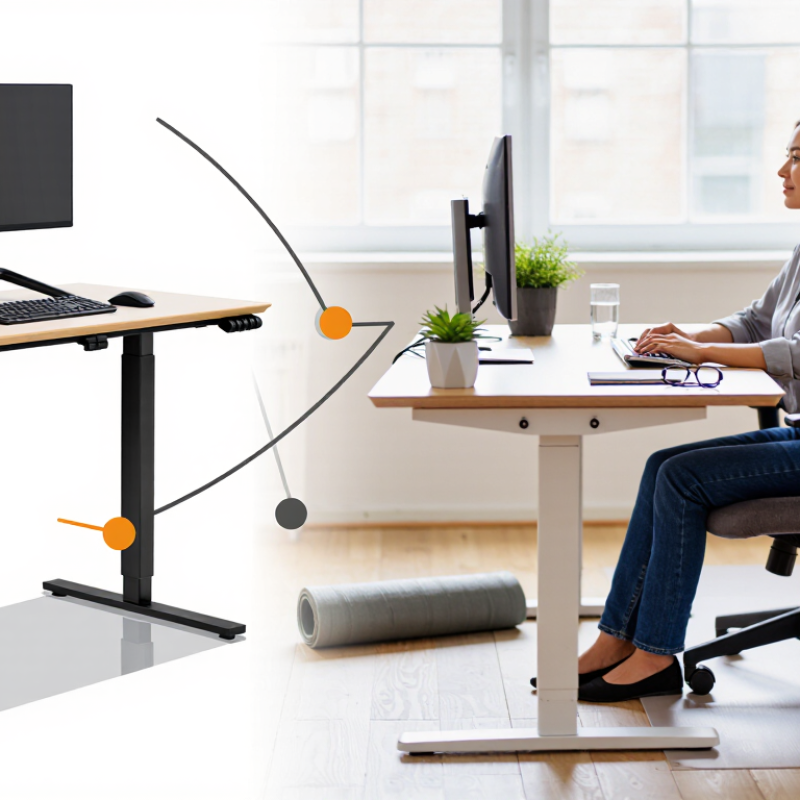
Set the monitor directly in front of you. Keep its top edge at eye level or slightly lower. Place the screen about 50–70 centimeters away. OSHA recommends keeping the head balanced over the shoulders, rather than reaching toward the display. A laptop stand and separate keyboard can help. I have seen users raise the screen but forget the keyboard, creating tense, lifted shoulders.
Keep your elbows near your sides, bent roughly 90–110 degrees. Your keyboard should sit close enough that your wrists stay straight. Adjust the chair so both feet rest firmly on the floor. Support the lower back, but do not push the chest rigidly forward. Small changes work better than dramatic corrections. The 2023 BLS report does not prove that one setup prevents injury. That limitation matters. Every body, desk, and task differs. Check your position after a long email, not only after adjusting the chair. Pain, numbness, weakness, or persistent headaches deserve assessment from a qualified healthcare professional.
Forward head posture often develops during long desk sessions, not overnight. The head drifts forward, while the upper back stiffens and the neck muscles work harder. Daily control exercises can gradually reverse this pattern.
They cannot replace medical assessment when pain, numbness, weakness, or dizziness appears.
Begin with a gentle chin tuck.
Sit tall, look straight ahead, and slide your head backward without looking down. Hold for five seconds and repeat eight times.
Then perform wall angels. Keep your ribs relaxed, place your back against a wall, and move your arms slowly upward. Stop before your shoulders lift.
Add thoracic extensions over a firm chair back, using five comfortable repetitions. Breathe normally throughout.
Use these exercises once or twice daily, especially after focused screen work. Every 30 minutes, let your arms hang and rotate your shoulders slowly.
I have found that smaller movements encourage better control than forceful stretching. My own posture still changes when I become absorbed in work. That is useful feedback, not failure.
Progress should feel steady, not sharp or alarming. If symptoms spread into an arm, reduce the exercise and seek advice from a qualified healthcare professional.
A physiotherapist can assess movement quality, work habits, and suitable progression. Pain-free consistency matters more than completing a demanding routine.
Forward head posture often appears when desk fatigue quietly changes your position. Sustainable movement habits work better than forcing a perfect posture all day. Every 25 to 30 minutes, look away from the screen and move your neck, shoulders, and upper back. Stand for a short task. Walk to refill your water. Small resets are easier to repeat than long exercise sessions.
I still catch myself leaning toward the screen during busy work. That is useful feedback, not failure. Keep the monitor near eye level, support your forearms, and place both feet on the floor. Gently draw your chin backward without pushing it down. Hold for three seconds, then relax. Evidence-informed guidance from physiotherapists supports gradual strengthening, regular movement, and symptom monitoring. If pain, numbness, weakness, or headaches persist, seek assessment from a qualified healthcare professional.
Tips: Pair movement with existing routines. Stretch after sending several emails or stand during a phone call. Use a quiet reminder, but do not depend on it forever. Notice when your shoulders rise. Let them drop. Avoid aggressive neck pulling. Consistency matters more than perfect form, although consistency is harder on stressful days.
Place the monitor directly in front of you. Keep its top edge at eye level or slightly lower. Sit about 50–70 centimeters away. Avoid reaching your neck toward the screen. Small adjustments help.
Yes. Raise the laptop screen with a stand, then use a separate keyboard. Otherwise, your shoulders may lift while typing. I have made this mistake myself.
Keep your elbows close to your sides. Bend them roughly 90–110 degrees. Place the keyboard nearby. Your wrists should remain straight, not sharply bent.
Keep both feet firmly on the floor. Support your lower back gently. Do not force your chest forward. A rigid posture can create new tension. Comfortable support matters more.
Try a gentle chin tuck. Sit tall and look ahead. Slide your head backward without looking down. Hold for five seconds. Repeat eight times.
Wall angels can improve controlled movement. Keep your ribs relaxed against a wall. Move your arms upward slowly. Stop before your shoulders lift. Thoracic extensions over a firm chair can also help.
Exercise once or twice daily, especially after screen work. Every 30 minutes, let your arms hang. Rotate your shoulders slowly. These pauses are brief but useful.
Progress should feel steady, not sharp or alarming. Smaller movements may improve control better than forceful stretching. My posture still changes during intense work. That is feedback, not complete failure.
Seek qualified healthcare advice for pain, numbness, weakness, dizziness, or persistent headaches. If symptoms spread into an arm, reduce the exercise. Do not push through warning signs.
Forward head posture often develops when long hours at a desk encourage the head to drift forward while the upper back rounds and the shoulders tighten. Learning how to fix forward head posture from desk work begins with assessing your sitting position, neck mobility, upper-back movement, and daily workplace risks. A desk that is too high or low, an improperly placed monitor, and unsupported arms can all increase strain and make poor posture harder to correct.
Effective improvement combines workspace adjustments with consistent movement. Position the monitor near eye level, keep the keyboard and mouse close, support your feet, and allow your elbows to rest comfortably. Daily exercises such as chin tucks, gentle chest stretches, shoulder blade control, and upper-back mobility drills can help restore alignment and strength. Short movement breaks, posture checks, and alternating sitting with standing make these changes sustainable, helping the neck and upper back maintain better control throughout computer work.

Health Line